How to Get a Telegram Bot Token from BotFather (2026)
Get a Telegram bot token from BotFather with /newbot, read the digits:secret format, view the current token with /mybots, and regenerate a leaked one with /token.
 Converge Team
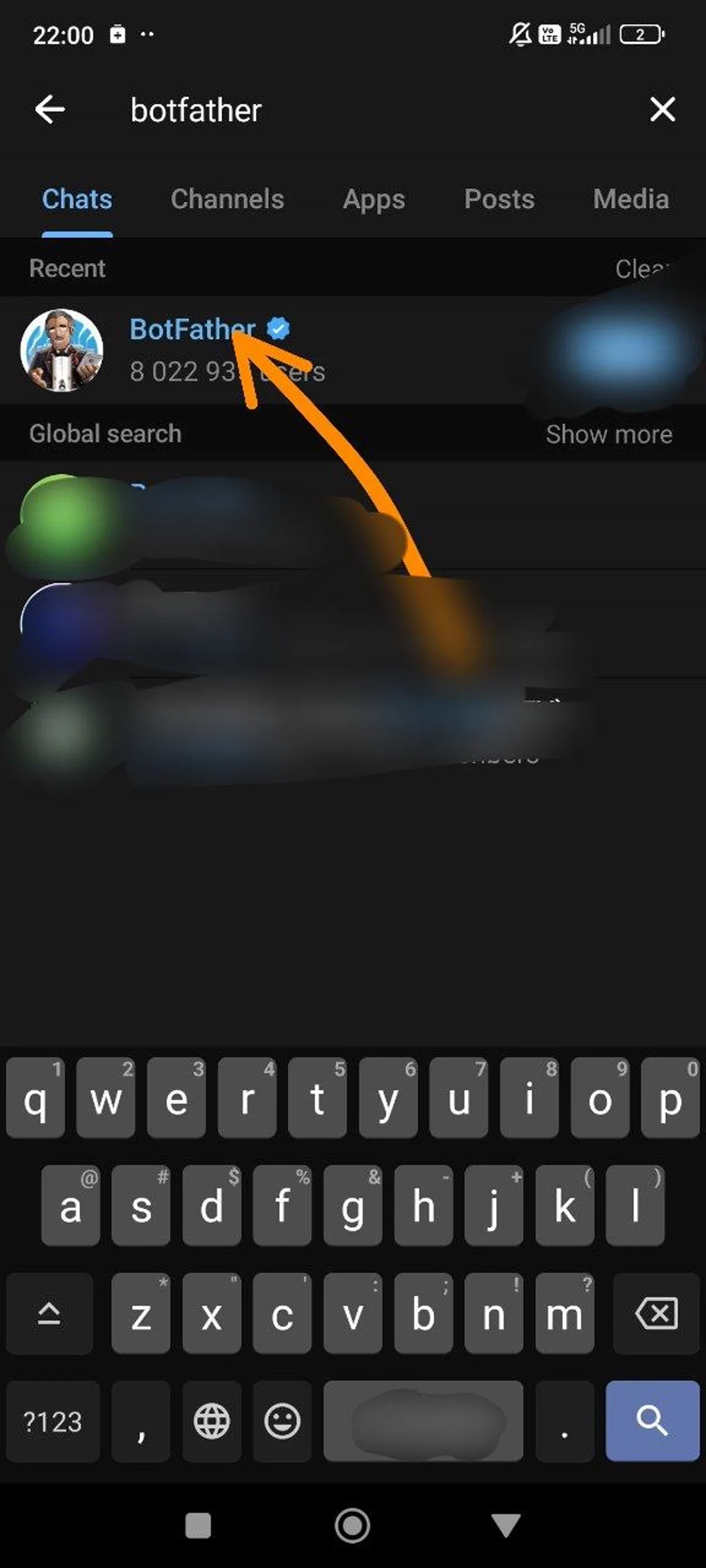
Open BotFather on Telegram
Open t.me/botfather — the exact link Telegram's own documentation points at. Follow the link instead of typing "BotFather" into Telegram search. Bot usernames are first-come-first-served, look-alike accounts exist, and an impostor's whole job is to be the account you paste a token at later. If you do search, the genuine account carries a verification badge — but following the documented link is the safer habit.
Telegram's tutorial defines the credential you are about to collect precisely: a token is "a string that authenticates your bot (not your account) on the bot API" (core.telegram.org/bots/tutorial). It is not tied to your phone number, and Telegram documents no expiry for it — the only documented way it stops working is you replacing it.
Where tokens legitimately come from. For a bot you create yourself, BotFather is the only issuer. No third-party "token generator" produces a string the Bot API will accept. Telegram documents one narrow exception — a manager bot flagged can_manage_bots can pull tokens for bots it created, via getManagedBotToken — which has nothing to do with setting up a support inbox.
Press Start to open the conversation. BotFather answers with its command list, and Telegram notes that BotFather itself is the authoritative reference for that list, because new commands are added without announcement.
Create a new bot with /newbot
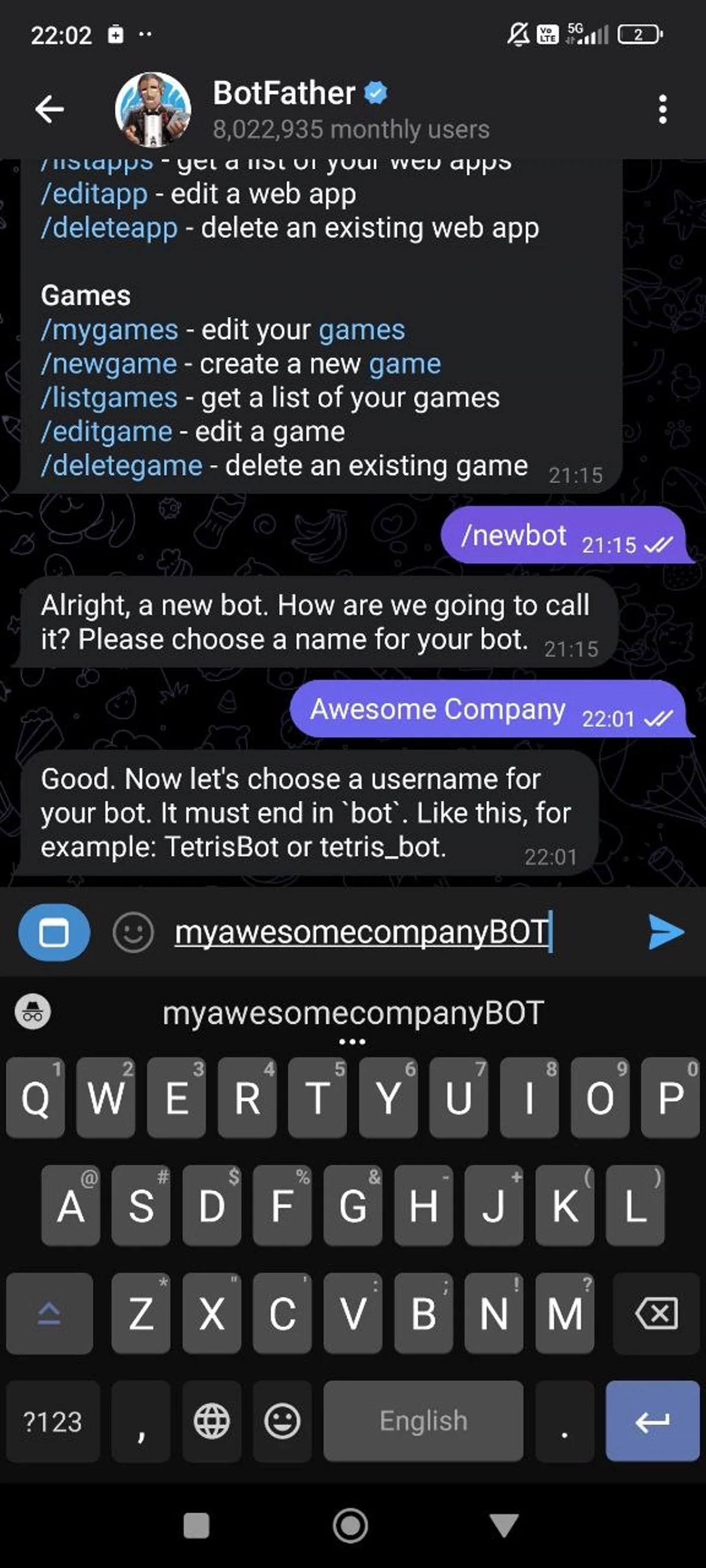
Send /newbot to BotFather. It asks for two things in order — a display name, then a username — and issues the token once both are accepted.
Display name. What customers see in the chat header and in contact details ("Acme Support", "Northwind Assistant"). Telegram places no format rules on it, and you can change it later with /setname.
Username. Telegram's documented rules: 5–32 characters, not case sensitive, Latin letters, numbers and underscores only, and it must end in "bot" — tetris_bot and TetrisBot are both valid forms in Telegram's own examples. It also has to be unique across all of Telegram, so expect a few rejections before one sticks.
The username cannot be changed later. Telegram states this outright, and it is the only permanent decision in the whole flow — display name, description, photo and even the token are all editable afterwards. It becomes your bot's public t.me/ link, so pick something a customer would believe belongs to your company.
Once both fields are accepted, BotFather confirms the bot and sends the token in the same message.
Optional polish, with the limits Telegram documents:
/setdescription— up to 512 characters, shown under "What can this bot do?" before a customer presses Start./setabouttext— up to 120 characters, shown on the bot's profile and sent along whenever someone shares the bot./setuserpic— profile picture./setcommands— the command menu customers see when they type/.
All four are also reachable through the inline interface at /mybots, and none of them are required to get a token (Telegram Bot Features).
Copy and understand your bot token format
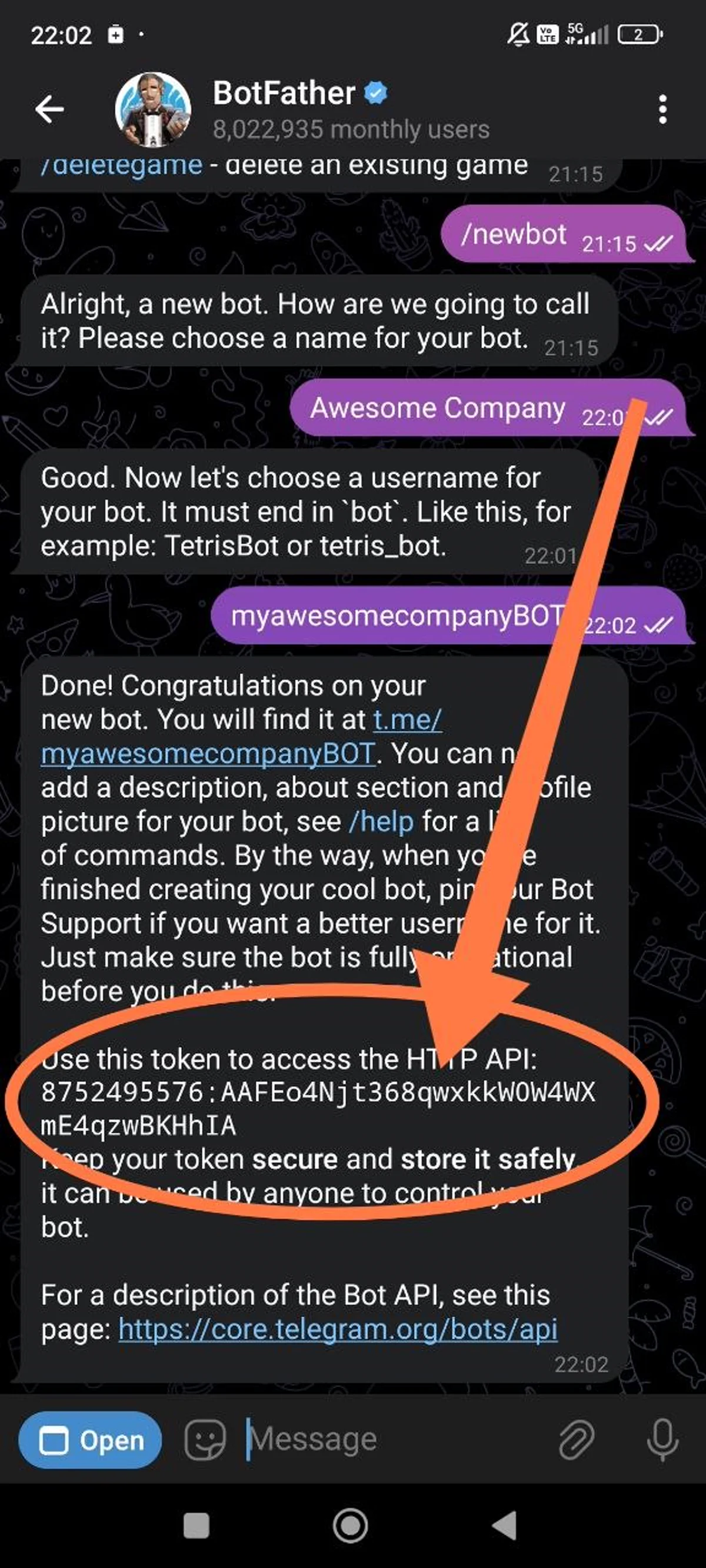
BotFather sends the token inside its confirmation message, labelled HTTP API token. Copy the whole string. It is the only credential the Bot API accepts — every request is addressed as https://api.telegram.org/bot<token>/METHOD_NAME, so a token that is short by one character fails every call outright rather than degrading.
The shape. Telegram's API reference documents the token as a numeric ID, a colon, then a secret, and publishes this placeholder for it: 123456:ABC-DEF1234ghIkl-zyx57W2v1u123ew11 (Bot API, "Authorizing your bot"). Read against the two other examples Telegram publishes:
- Before the colon — digits only. Telegram's published examples run from 6 digits in the API reference to 10 in the current BotFather tutorial. The number climbs as more bots are registered, so a bot created today gets a longer ID than one from 2015.
- The colon — exactly one
:, and it is part of the token. Dropping it is the single most common paste error. - After the colon — the secret. Letters, digits and hyphens appear in Telegram's examples, all three of which are 34 characters long. Telegram publishes no guaranteed length, so treat the secret as opaque and never reconstruct it by hand.
Every string above is Telegram's own documentation placeholder, and this page prints no realistic-looking sample on purpose: anything in a help article that resembles a working credential is a credential somebody will eventually try.
Handling it after you copy it:
- Anyone holding the token can read every message sent to your bot and post as your bot. There is no second factor and no IP allowlist.
- Keep it out of screenshots, support tickets, issue trackers and chat history — including the chat you are copying it from.
- In code, read it from an environment variable or a secrets manager. A token in a committed
.envis a public token. - Pasting
api.telegram.org/bot<token>/getMeinto a browser is the quickest validity check, and Telegram's tutorial suggests it — but the address bar writes the token into history, autocomplete and any corporate proxy log. Prefer a terminal, and regenerate afterwards if the machine is not yours.
Recover, revoke, or regenerate your Telegram bot token
The current token is never lost. BotFather holds the active token and will display it on request, so "I lost my Telegram bot token" almost always means "I have not looked it up yet". What is genuinely unrecoverable is a token you have already replaced — Telegram keeps no history of superseded tokens.
To read the token you already have:
- Open @BotFather
- Send
/mybots - Select the bot
- Tap API Token — the active token is shown
Do not send /token when you only want to look. Telegram documents that command under the heading "Generating an authentication token": "If your existing token is compromised or you lost it for some reason, use the /token command to generate a new one" (Telegram Bot Features). It replaces the credential rather than reciting it. Sending it to jog your memory silently breaks every live integration still holding the old string, Converge included, until you paste the new value in.
To deliberately replace a leaked token, that same /token command is the documented route: send it, pick the affected bot, and the replacement arrives in the next reply. BotFather offers the same action as a Revoke current token button under /mybotsyour botAPI Token.
What a replacement changes, and what it does not:
- The old token stops authenticating at once. Anything still using it starts failing immediately, with no grace period.
- Username, display name, description, profile photo, command menu and past conversations are untouched. Customers see nothing at all.
- Telegram queues undelivered updates for at most 24 hours (Bot API, "Getting updates"). Messages that arrive while your integration is down survive inside that window and are gone after it, so reconnect the same day rather than the same week.
Replace the token when it reached a public repository, a screenshot, a shared document or a support ticket; when a contractor or departing colleague had a copy; or when you cannot account for where the copies live. Rotation is free and takes under a minute, which makes hesitation hard to justify.
BotFather's command list changes without announcement, and Telegram's documentation names BotFather itself as the authoritative reference for it — type / in the BotFather chat to see what your account currently supports.
Connect your bot to Converge
With the token in hand, Converge puts Telegram in the same inbox as WhatsApp, Messenger and your other channels — $87/month flat rate for up to 15 agents, no per-channel add-ons.
Go to SettingsPlatformsTelegram, paste the token into the Bot Token field and press Enable. Only Owners and Admins can see this screen; Agent accounts cannot connect platforms.
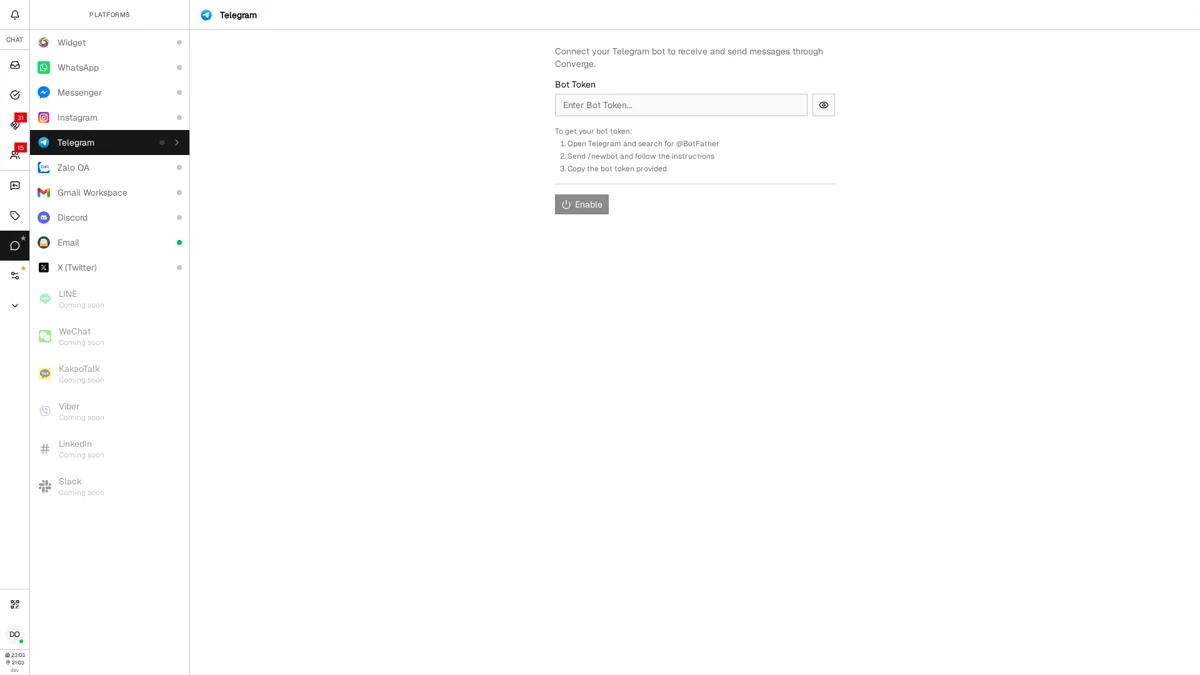
Converge opens a Telegram session with the token, reads the bot's username back from Telegram, and starts collecting messages. If Telegram rejects the credential, the integration is switched off again with an "Invalid bot token" error rather than sitting there looking connected.
How the messages actually arrive matters here: Converge uses long polling, not a webhook. The Bot API calls polling and webhooks "two mutually exclusive ways of receiving updates" and states plainly that getUpdates "will not work if an outgoing webhook is set up" (Bot API). A webhook left behind on that bot by an earlier tool will therefore keep Converge silent.
Verify it: message the bot from your own Telegram account. Bots cannot open a conversation first, so the customer always sends the first message. Yours should land in the Converge inbox within seconds, and you can answer without opening Telegram.
When it does not work:
- 401 Unauthorized / Invalid token. The string is wrong or has already been replaced. Re-copy it whole from
/mybotsyour botAPI Token — no leading space, no missing colon, no truncation. - Nothing arrives and there is no error. Suspect a leftover webhook from an n8n flow, a self-hosted script or an older platform.
getWebhookInforeturns an emptyurlwhen the bot is free to poll;deleteWebhookclears one, and Telegram documents it for exactly this "switch back to getUpdates" case. - Conflict: terminated by other getUpdates request. Two processes are polling the same token. Stop the other one, or replace the token with
/tokento cut every existing session loose at once. - You need to swap the token. A live connection cannot be edited in place — press Disable first, then paste the new token and Enable again.
- Group messages are missing. Expected behaviour. Privacy mode is on by default and limits what a bot sees in groups. It never applies to private chats, and one-to-one support conversations are private chats.
The full walkthrough of the connection screen, including what the customer profile shows and how to disconnect, lives in how to connect Telegram to Converge.
Frequently Asked Questions
A bot token is a numeric ID, a colon, then a secret string. Telegram's API reference publishes the placeholder 123456:ABC-DEF1234ghIkl-zyx57W2v1u123ew11 for it. The ID before the colon is digits only and runs from 6 to 10 digits across Telegram's published examples, growing as more bots are registered. The secret after the colon mixes letters, digits and hyphens and is 34 characters long in all three examples Telegram publishes, but Telegram guarantees no length — copy the whole string, colon included, rather than validating it by shape.
Send /token to @BotFather and select the bot. Telegram documents that command as the way to generate a new token when the existing one is compromised or lost, and issuing it invalidates the old token immediately. BotFather offers the same action as a Revoke current token button under /mybots, your bot, API Token. The bot's username, display name, settings and conversation history are unaffected; you only have to paste the new token into every service that held the old one.
Open t.me/botfather, press Start, and send /newbot. BotFather asks for a display name, then a username — 5 to 32 characters, Latin letters, numbers and underscores only, and it must end in 'bot'. The token arrives as soon as both are accepted. The flow is unchanged as of Bot API 10.3, dated 24 August 2026 in the changelog at core.telegram.org/bots/api, and for a bot you create yourself BotFather is still the only issuer.
A bot has exactly one active token at a time, and generating a new one immediately invalidates its predecessor. You can create as many separate bots as you want through BotFather, each with its own token. Converge connects one Telegram bot per workspace, so running a second bot means a second workspace.
You do not need to recover it, because BotFather still holds the active token. Open @BotFather, send /mybots, select your bot and tap API Token to display it. Do not send /token for this: Telegram documents /token as generating a new token, which invalidates the one your live integrations are using. Only a token you have already replaced is unrecoverable, since Telegram keeps no history of superseded tokens.
It is the credential that authenticates your bot — not your Telegram account — against the Bot API. Telegram documents the request form as https://api.telegram.org/bot followed immediately by the token, then a slash and the method name, so the token sits inside the URL of every single call. You get it from @BotFather on Telegram by running /newbot. There is no web dashboard and no legitimate third-party generator; for a bot you create yourself, BotFather is the only issuer.
Call the getMe method with it. Request https://api.telegram.org/bot followed by your token and then /getMe: a valid token returns the bot's id, username and capability flags, and an invalid one returns an error object. Telegram's own tutorial suggests this as the first check. Doing it in a browser address bar writes the token into history, autocomplete and any proxy log, so prefer a terminal — and replace the token afterwards if the machine is shared.
No. The Bot API describes them as two mutually exclusive ways of receiving updates and states that getUpdates will not work while an outgoing webhook is set. If a bot goes silent after you connect it to a new tool, a webhook left behind by a previous integration is the usual cause: getWebhookInfo returns an empty url when none is set, and deleteWebhook clears one. Either way, undelivered updates are held for at most 24 hours.
Yes, though the limits attach to the bot rather than the token, so replacing the token changes nothing. Telegram's Bots FAQ (core.telegram.org/bots/faq) gives roughly one message per second in a single chat, no more than 20 messages per minute in a group, and about 30 messages per second for bulk broadcasts, above which the API starts returning 429 errors. The same page puts outgoing file uploads at up to 50 MB while getFile only serves downloads up to 20 MB.
Anyone holding the token can read every message sent to your bot and post as your bot — there is no second factor and no IP allowlist. Replace it at once: send /token to @BotFather, pick the affected bot, and the old string stops authenticating immediately. Then paste the new token everywhere the old one was stored, and go find the copy that leaked, whether it sits in a repository, a screenshot or a ticket.
No, they are different credentials. A bot token (from @BotFather) authenticates a specific bot and takes the form of a numeric ID, a colon, then a secret string. A Telegram API ID and API hash (from my.telegram.org) are for building full Telegram client applications using the Telegram API/TDLib. Most people creating bots for customer support or automation only need the bot token from BotFather.
Store your bot token in an environment variable or a .env file, never directly in your source code. Add .env to your .gitignore so it's excluded from version control. When deploying, use your hosting provider's secrets manager or environment configuration to inject the token at runtime. This prevents accidental exposure if your code repository becomes public.
Related Articles
Ready to try Converge?
$87/month flat. Up to 15 agents. 7-day free trial, no credit card required.
Start Free Trial