WhatsApp for Customer Support
 Converge Team
World's most-used messaging app with 3B+ monthly active users (Meta, Q1 2025)
WhatsApp customer support software connects a WhatsApp Business Account to a shared team inbox over Meta's Cloud API, so several agents answer one business number instead of crowding around a single phone. WhatsApp passed 3 billion monthly active users in April 2025, Meta CEO Mark Zuckerberg confirmed during the company's Q1 2025 earnings call (Meta, 2025) — it is now the largest messaging platform in the world and a default support channel across Europe, Latin America, India, and Southeast Asia — as well as the Gulf, where it is the primary inbound channel for customer support software for Qatar businesses. The consumer app handles one-to-one chats, but multi-agent customer support runs on the WhatsApp Business Platform — specifically the Cloud API — which connects a WhatsApp Business Account to a helpdesk so multiple agents share the same inbox.
The Business Platform splits outbound contact into four conversation categories — Marketing, Utility, Authentication, and Service — each priced separately by Meta. Service messages (replies inside a customer-initiated, rolling 24-hour window) were free from November 1, 2024 through September 30, 2026. From October 1, 2026, Meta charges for service messages per message at each market's utility and authentication rate, after a free allowance of 1,000 delivered service messages per business phone number per month. Converge connects to the Cloud API natively, but Meta bills those charges to your own WhatsApp Business Account through the payment method set in WhatsApp Manager — they are not part of, or marked up by, the Converge plan.
monthly active WhatsApp users globally as of April 2025, Meta CEO Mark Zuckerberg confirmed on the Q1 2025 earnings call. WhatsApp is the most-used messaging app on the planet. — Meta Q1 2025 earnings / TechCrunch, 2025
WhatsApp for Support: Strengths & Considerations
Strengths
- Real-time messaging for faster resolution
- 3+ billion active users
- Rich media support (images, files)
- Familiar interface customers already know
Considerations
- Requires dedicated platform integration
- May need unified inbox to manage at scale
- Business API setup may be required
- Response time expectations are higher
Benefits of WhatsApp for Customer Support
WhatsApp's open rate and read speed make it one of the highest-converting channels for time-sensitive support. Until October 1, 2026, the Business Platform's 24-hour customer service window means inbound support traffic carries no per-message cost — once a customer messages you, you can respond with text, images, documents, and even utility templates for the next 24 hours at zero per-message charge. From October 1, 2026, Meta charges per message for both of those (Meta, 2026), and only the first 1,000 service messages per business phone number each month stay free.
- ~98% message open rates per Meta-cited business case studies, compared with roughly 20% for marketing email
- Rich media support — images, documents, PDFs, audio — handles visual troubleshooting in one message instead of a five-step text thread
- Persistent conversation history keeps full context across days or weeks of interactions
- Mobile-first experience matches how customers actually message friends and family
- The 24-hour service window covers most support load free of charge until October 1, 2026; outbound templates are billed per message by category throughout
For higher-volume teams, the four conversation categories drive almost all WhatsApp cost. Marketing templates (promotional broadcasts) carry the highest per-message rates and vary by country. Utility templates (order confirmations, shipping updates, appointment reminders) run roughly 60-80% cheaper than marketing in most markets, and are free when sent inside an active 24-hour service window until October 1, 2026, when that exemption ends. Authentication templates (one-time codes, 2FA) are the cheapest category Meta offers. Service messages — anything you send during the customer-initiated window — remain free until October 1, 2026, when Meta begins charging for them per message at each market's utility and authentication rate (Meta, 2026). If that reversal changes your channel math, our breakdown of Telegram vs WhatsApp for business support re-runs the cost comparison under the new model. Meta's rates are only half the bill, though: several inbox platforms meter conversations on their own definition on top of Meta's and bill the excess at a premium, so anyone pricing a Trengo alternative should read the platform's conversation window and overage terms before comparing headline prices.
Budget WhatsApp by counting agent replies, not just templates. From October 1, 2026, replies and utility templates sent inside an open 24-hour window are billed at the utility rate for the customer's country, so a busy support number now has a monthly message bill even if it never sends a template cold.
free service messages per business phone number per month from October 1, 2026, when Meta starts billing replies sent inside a customer's 24-hour window at each market's utility rate. Service messages had been free and uncapped since November 1, 2024. The allowance resets monthly and does not roll over. — Meta WhatsApp Business Platform pricing documentation, 2026
Best Practices for WhatsApp Support
WhatsApp customer support works best when teams operate inside the 24-hour service window as much as possible — let customers initiate, then run the full conversation from a shared inbox while the window is open. Outside the window, you need pre-approved templates, which Meta reviews against the four-category policy and a quality rating system that scales (or restricts) your phone number's daily messaging tier. Before you size the channel, check Meta's own published figures — user counts, per-conversation pricing, and the current rate-card dates — rather than the recycled numbers most roundups carry.
- Configure the WhatsApp Business profile with clear business hours, business address, and the response time customers should expect
- Match templates to the right category: utility for transactional updates, authentication for one-time codes, marketing only with explicit opt-in
- Monitor your phone number's quality rating (Green / Yellow / Red) inside WhatsApp Manager — a Red rating drops your daily messaging tier and can pause outbound entirely
- Use Click-to-WhatsApp ads on Facebook or Instagram when you want a 72-hour free messaging window for lead nurturing
- Send screenshots, screen recordings, and PDF guides for complex troubleshooting — rich-media replies resolve issues that take multiple paragraphs to explain in plain text
Converge connects to the WhatsApp Cloud API natively at $49/month flat for up to 15 team members. AI reply suggestions, message translation, auto-routing, and quality monitoring are included; Meta's per-message charges are billed by Meta directly to your WhatsApp Business Account, separately from the plan.
WhatsApp's 4 conversation categories — marketing, utility, authentication, and service — each have separate pricing. Service was free until September 30, 2026 and is billed at the utility rate from October 1. Get this wrong (mis-categorize a marketing broadcast as utility) and Meta will downgrade your quality rating, which caps your daily send limit.
What is a shared WhatsApp team inbox, and why do support teams need one?
A shared WhatsApp team inbox is one WhatsApp Business number connected to a helpdesk where every agent sees, claims, and replies to incoming chats from a single queue — instead of taking turns on one phone. It exists because the WhatsApp Business app caps a number at a handful of linked devices and shows no assignment, no read-state per agent, and no way to stop two people replying to the same customer.
The free WhatsApp Business app is built for a solo operator: one number, one set of linked devices, basic away messages. The moment a second agent needs to answer the same number, you hit its ceiling — there is no conversation assignment, no internal notes, no record of who replied, and no collision detection. Two agents routinely answer the same customer, and nothing tracks first-response time.
A shared inbox built on the WhatsApp Business Platform (Cloud API) removes that ceiling. Incoming messages land in a queue every agent can see; conversations get assigned (manually or by round-robin/load-balanced routing); each customer carries a profile with full history across WhatsApp and any other connected channel; and internal notes let agents hand off context without the customer seeing it. In Converge, an inbound WhatsApp message also opens the 24-hour service window, and the app surfaces a live service-window indicator on the conversation so an agent knows at a glance whether a free-form reply is still allowed or whether the next outbound message needs a pre-approved template.
Where vendors differ most is not the inbox itself but how they meter it. Some price on monthly active contacts and cap the number of agents and channels per tier, so the bill moves with engagement rather than headcount — anyone weighing a SleekFlow alternative should compare the yearly and month-to-month rates and the per-number hosting fee before comparing headline prices, because the quoted figure is usually the annual one.
How do you connect WhatsApp to Converge?
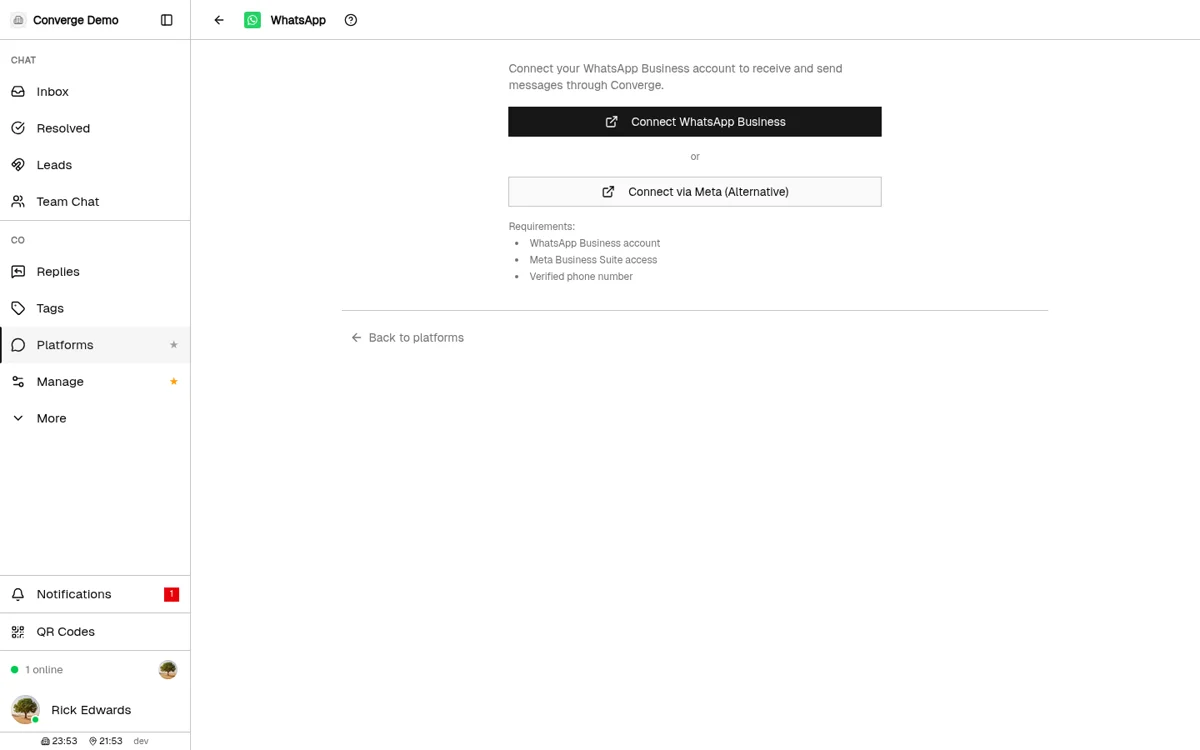
In Converge you connect WhatsApp under PlatformsWhatsApp using Meta's Embedded Signup — click Connect WhatsApp Business, pick your WhatsApp Business Account and phone number in Meta's popup, and Converge exchanges the code and subscribes to your number. No manual access token, Phone Number ID, or webhook URL to paste.
Converge uses Meta's official Embedded Signup flow, so the connection is a popup rather than a developer setup. The concrete steps:
- Open PlatformsWhatsApp in Converge and click Connect WhatsApp Business. A Meta-hosted popup loads (the Facebook SDK), so allow popups and disable any ad blocker that strips it.
- Pick your WhatsApp Business Account and phone number inside Meta's window. You need a WhatsApp Business Account, Meta Business Suite access, and a verified phone number — the same prerequisites Meta lists for any Business Platform provider.
- Converge exchanges the authorization code returned by Meta, stores the credentials encrypted, and subscribes your number to receive webhooks. When it finishes, the connected phone number shows in the integration panel.
- Run the built-in health check. Converge flags the common failure: if another BSP (business solution provider) is still subscribed to your WhatsApp Business Account under Meta Business SettingsPartners, it can block sending with Meta Error 200 — remove the stale partner and confirm a payment method is set in WhatsApp Manager.
If the popup is blocked on your network, Converge offers an alternative "Connect via Meta" link that opens Meta's hosted setup in a new tab and polls until the connection completes. Either path lands you in the same place: a connected number with message templates manageable directly in the app.
How do you create and manage WhatsApp message templates in Converge?
Open the connected WhatsApp panel in Converge and click New Template to define a UTILITY, MARKETING, or AUTHENTICATION template — set a lowercase name, language, optional header/footer, and body text with {{1}} {{2}} variables. Converge submits it to Meta for review and shows each template's live status (APPROVED, PENDING, REJECTED) so you only send approved ones outside the 24-hour window.
Outside the 24-hour service window, WhatsApp only lets you send pre-approved templates, and Meta reviews each one against its four-category policy. Converge manages that lifecycle inside the app rather than sending you to WhatsApp Manager for routine work:
- Create: the New Template dialog enforces Meta's naming rule (lowercase alphanumeric + underscores, e.g.
order_confirmation), a category (Utility, Marketing, or Authentication), a language, and a body with numbered variables likeHi {{1}}, your order {{2}} has shipped. Header and footer are optional. - Track status: each template lists its category, language, and Meta review status colour-coded — green APPROVED, yellow PENDING, red REJECTED — so an agent never picks a template that Meta has not cleared.
- Refresh and delete: a 30-second-cooldown refresh pulls the latest statuses from Meta, and templates can be deleted in-app. For advanced templates with media headers, buttons, or carousels, Converge links straight to WhatsApp Manager.
Picking the right category matters for cost, not just approval: utility templates run roughly 60–80% cheaper than marketing in most markets and were free inside an active service window until September 30, 2026, while authentication is the cheapest category Meta offers.
How much does WhatsApp customer support cost per message in 2026?
From October 1, 2026, inbound support is no longer free: Meta charges for service messages (any reply inside a customer's 24-hour window) at each market's utility rate, after 1,000 free service messages per business phone number per month — about $0.0034 per reply in North America. Those replies had cost nothing since November 1, 2024. Outbound templates sent outside the window are billed per delivered message by category — in the US, roughly $0.025 marketing, $0.004 utility and $0.004 authentication on Meta's January 2026 rate card. Some business solution providers (BSPs) add their own per-message markup on top of Meta's base rate.
Meta switched from per-conversation to per-message billing on July 1, 2025, so each delivered template message is now an individual charge rather than a flat fee for a 24-hour window. Rates are set per country and per category; the figures below are Meta's base rates as reported by authorized BSP rate cards current to Meta's January 2026 adjustment. They exclude the BSP markup (typically $0.003–$0.010 per message).
| Market | Marketing | Utility | Authentication | Service |
|---|---|---|---|---|
| United States | $0.025 | $0.004 | $0.004 | $0.0034 from Oct 1, 2026 (North America rate) |
| United Kingdom | ~$0.048 | ~$0.020 | ~$0.020 | $0.0220 from Oct 1, 2026 |
| Brazil | $0.0625 | $0.0068 | $0.0068 | $0.0068 from Oct 1, 2026 |
| India | ~$0.010 | ~$0.0014 | ~$0.0014 | $0.0014 from Oct 1, 2026 |
The Service column is the rate effective October 1, 2026, taken from SleekFlow's published WhatsApp rate card, which reproduces Meta's rates and lists the pre-October column ($0 in every market) beside it. Every service rate applies only after the first 1,000 service messages per business phone number each month.
What decides most WhatsApp bills?
Three billing nuances decide most WhatsApp bills:
- Replies inside the service window are billed from October 1, 2026. Agent replies and utility templates sent inside an open 24-hour window were free until September 30, 2026. From October 1, each market's utility rate applies after the 1,000 free service messages per number per month. A team sending 3,000 agent replies a month from one number pays for 2,000 of them: $6.80 in North America, $44.00 in the UK and $110.00 in Germany at the October rates, against $0 before. For a US-focused team that is a rounding error; for a Western European one it is a real line item.
- Volume tiers exist for utility and authentication, not marketing. Meta discounts utility and authentication messages by up to ~30% at high monthly volume; marketing has no volume discount path, which is why marketing sends dominate cost at scale. Service messages billed from October 1, 2026 carry no volume tiers either.
- The 72-hour free entry point. When a customer taps a Click-to-WhatsApp ad and you reply within 24 hours, a 72-hour window opens that covers every category, including marketing templates — the cheapest way to send promotional messages in high-rate markets like the UK or Germany.
What sits on top of Meta's WhatsApp rates?
One compliance cap catches high-volume marketers off guard: Meta limits a single user to roughly two marketing template messages per day across all businesses combined, and blocked sends return Cloud API error code 131049. It is enforced at the user level, so extra phone numbers or a different BSP cannot work around it. BSPs also differ in what they stack above Meta's rates: CM.com, named a Meta Premier Partner in July 2026, bills a channel subscription and a monthly message bundle of its own on top of the per-message rates in the table, which is why anyone weighing CM.com alternatives should add both layers before comparing headline prices. Converge connects to the Cloud API natively at $49/month flat for up to 15 team members and adds no message layer of its own: Meta bills its per-message charges straight to your WhatsApp Business Account.
Platform Support Comparison
See which customer support platforms offer native WhatsApp integration.






*Pricing shown for comparison purposes. Visit platform websites for current pricing details.
Popular in These Regions
Ready to try Converge?
$49/month flat. Up to 15 agents. 7-day free trial, no credit card required.
Start Free TrialFrequently Asked Questions
The WhatsApp Business Platform (Cloud API) is free to connect, but from October 1, 2026 support traffic is no longer free to run. Meta now charges for service messages — any reply you send inside a customer's 24-hour window — at each market's utility rate, after 1,000 free service messages per business phone number per month; those replies had been free since November 1, 2024. Outbound templates sent outside the window are billed per delivered message by category (in the US, about $0.025 marketing, $0.004 utility and $0.004 authentication on the January 2026 rate card). Meta bills all of it to your own WhatsApp Business Account. Converge's $49/month flat rate for up to 15 agents covers the shared inbox, not Meta's message charges.
For a small team, the best WhatsApp customer support software is whichever shared inbox connects natively to the WhatsApp Business Platform (Cloud API) and prices for a whole team rather than per agent. Converge connects WhatsApp via Meta's Embedded Signup and runs at $49/month flat for up to 15 agents, with AI reply suggestions, message translation, and auto-routing included; Meta bills its per-message charges to your WhatsApp Business Account separately. Per-seat tools like Zendesk and Intercom add up faster as you add agents, so for teams of 3–15 a flat-rate shared inbox is usually the lower total cost.
Yes — but only through the WhatsApp Business Platform (Cloud API), not the free WhatsApp Business app. The app limits a number to a small set of linked devices with no assignment or collision control. Connecting the same number to a shared inbox like Converge over the Cloud API lets every agent work one queue, with conversation assignment, internal notes, customer profiles, and routing, so two agents never answer the same chat blind.
A new WhatsApp business portfolio starts at 250 unique recipients per rolling 24 hours, then scales to 2,000, 10,000, 100,000, and finally unlimited as message quality and volume hold up. Meta's documented path (updated May 21, 2026) is: clear the first jump to 2,000 by verifying your business or sending 2,000 high-quality template messages to unique numbers over a 30-day window, after which each higher tier is granted automatically within 6 hours once you use at least half your current limit over 7 days with a good quality rating. Crucially, these limits only count business-initiated messages sent outside the 24-hour customer service window — inbound replies and any message you send inside that window do not draw down the limit, so inbound-led support teams rarely hit the cap.
WhatsApp is a messaging platform with 3+ billion users worldwide. Businesses use WhatsApp for customer support because it allows real-time conversations, rich media sharing, and meets customers on a platform they already use daily. It's particularly popular in Global and Latin America.
To use WhatsApp for business support: 1) Create a business account on WhatsApp, 2) Connect it to a customer support platform like Converge, Zendesk, or Freshdesk, 3) Configure automated greetings and routing rules, 4) Train your team on response best practices. Setup typically takes 1-2 hours for basic configuration.
Platforms with WhatsApp integration include: Intercom, Tidio, Crisp, Livechat. Converge offers native WhatsApp support at $49/month flat for up to 15 agents.
Key benefits of WhatsApp for customer service include: real-time messaging for faster resolution, rich media support (images, files, voice), familiar interface customers already know, read receipts for transparency, and lower support costs compared to phone. WhatsApp's 3+ billion user base means you can reach customers where they already are.
Yes, Converge has native WhatsApp integration included in the $49/month flat rate. You can manage WhatsApp conversations alongside WhatsApp, Telegram, Instagram, Messenger, Discord, and Zalo in one unified inbox.