Every conversation.
One unified inbox.

A dedicated workspace that unifies your WhatsApp, Messenger, and Telegram business messages into a single inbox. Eliminate tab switching, automate routing, and respond faster with zero distraction.

Centralized inbox for WhatsApp, Telegram, Messenger & more
Tagging, Routing and AI-powered translation
Real-time team collaboration tools

Everything You Need to Excel

Powerful features designed to streamline your customer support workflow. Connect platforms, respond faster, and keep your team aligned.

3 New

End Fragmented Support

Stop juggling apps. Unify Telegram, WhatsApp, Zalo, Discord, and your website widget into one inbox.

Cut Response Times

Quick reply templates and real-time notifications keep conversations moving.

JD
AS

Empower Teams

Assign customers to agents, add private notes, and stay in sync.

Built-In Translation

Translate incoming and outgoing messages instantly.

Scale Confidently

No extra costs - Unlimited messaging, unlimited seats.

Built for Real Businesses

From solopreneurs to growing teams. Add employees, connect platforms, and stay organized.

Setup in minutes 99.9% Uptime

Own Your Customer Data

Every message and note stored securely. Export your data anytime. GDPR-compliant by design.

Why Customers Choose Converge

Support shouldn't mean chaos. Get clarity, speed, and control without enterprise complexity.

Get Started Now

See How Converge Works

Real screenshots showing exactly how you'll manage customer conversations across every channel.

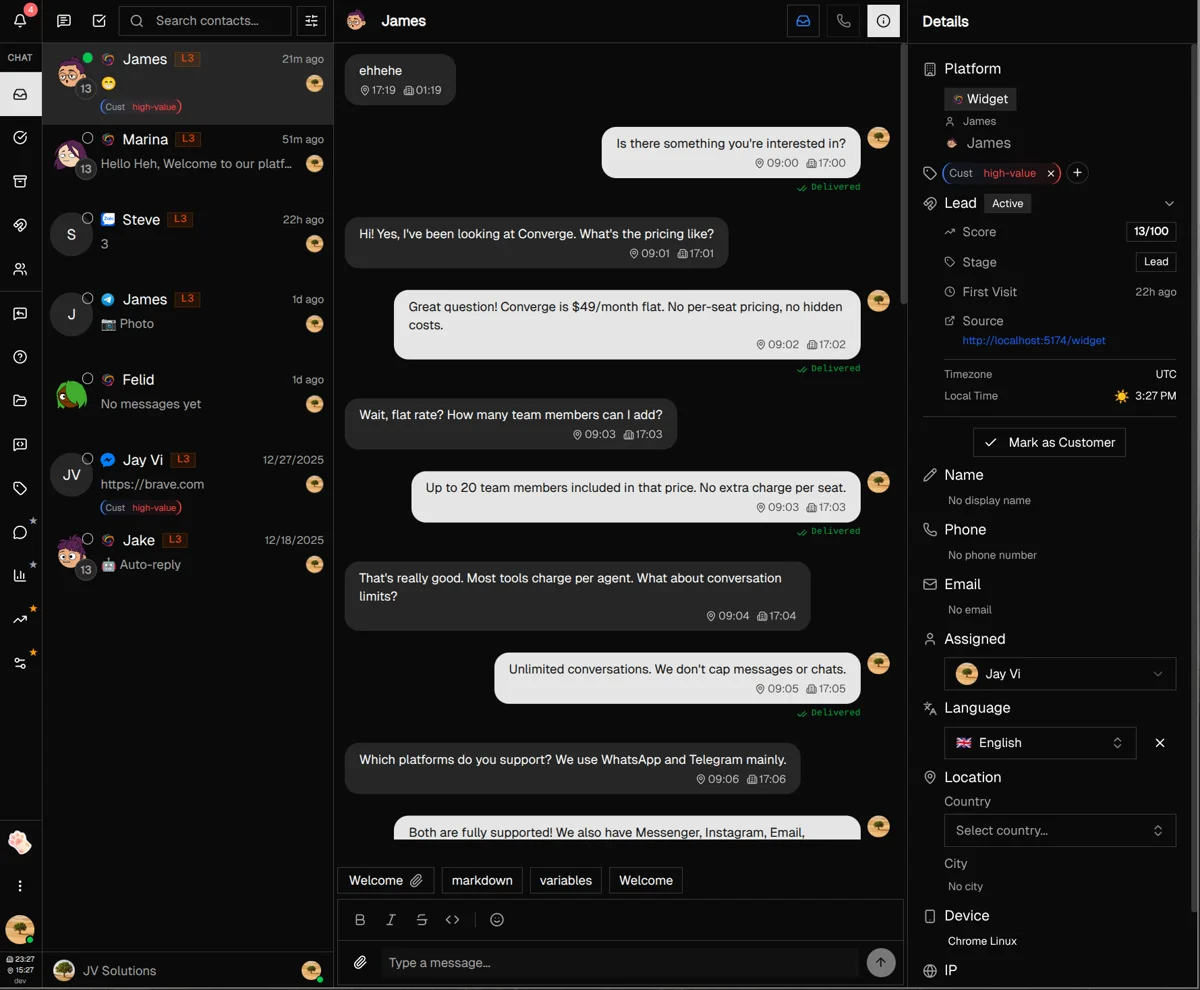
Unified Inbox for All Channels

Unified Inbox for All Channels

Every customer message—whether from WhatsApp, Telegram, Messenger, Instagram, or your website widget—appears in one organized inbox. Your team sees the full conversation history, customer details, and can respond without switching apps. No more scattered conversations across 5 different tools.

  • Three-panel layout: customer list, conversation, and details
  • Full message history across all channels in one thread
  • Customer profile with contact info, tags, and notes
  • Real-time typing indicators and read receipts
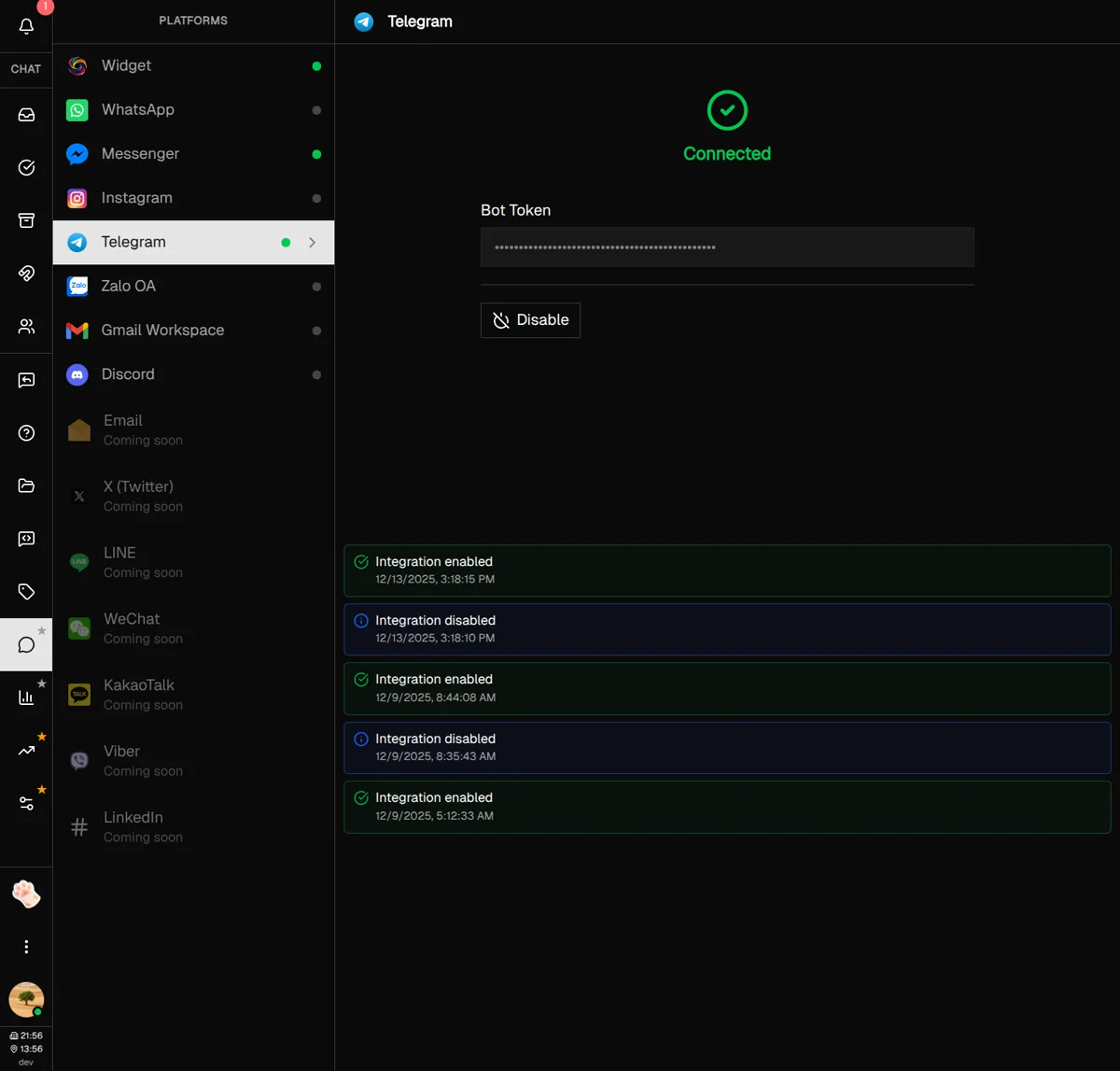
Connect All Your Messaging Platforms

Connect All Your Messaging Platforms

Integrate your business accounts from WhatsApp, Telegram, Facebook Messenger, Instagram DMs, Discord, Zalo, and Gmail in minutes. Each platform connects via official APIs with secure OAuth flows. When customers message you on any channel, it instantly appears in your unified inbox.

  • WhatsApp Business API with template management
  • Telegram bot integration with webhook support
  • Facebook Messenger and Instagram DM support
  • Discord server and Zalo OA connections
Lead Tracking & Scoring

Lead Tracking & Scoring

Anonymous website visitors become trackable leads the moment they interact with your chat widget. Converge captures UTM parameters, referral source, device info, and page visits automatically. Each lead gets a score based on engagement—so your team knows who's ready to buy.

  • Automatic visitor identification and scoring (0-100)
  • UTM attribution tracking for marketing campaigns
  • Lifecycle stages: Visitor → Engaged → Lead → Customer
  • Filter and sort leads by score, source, or activity

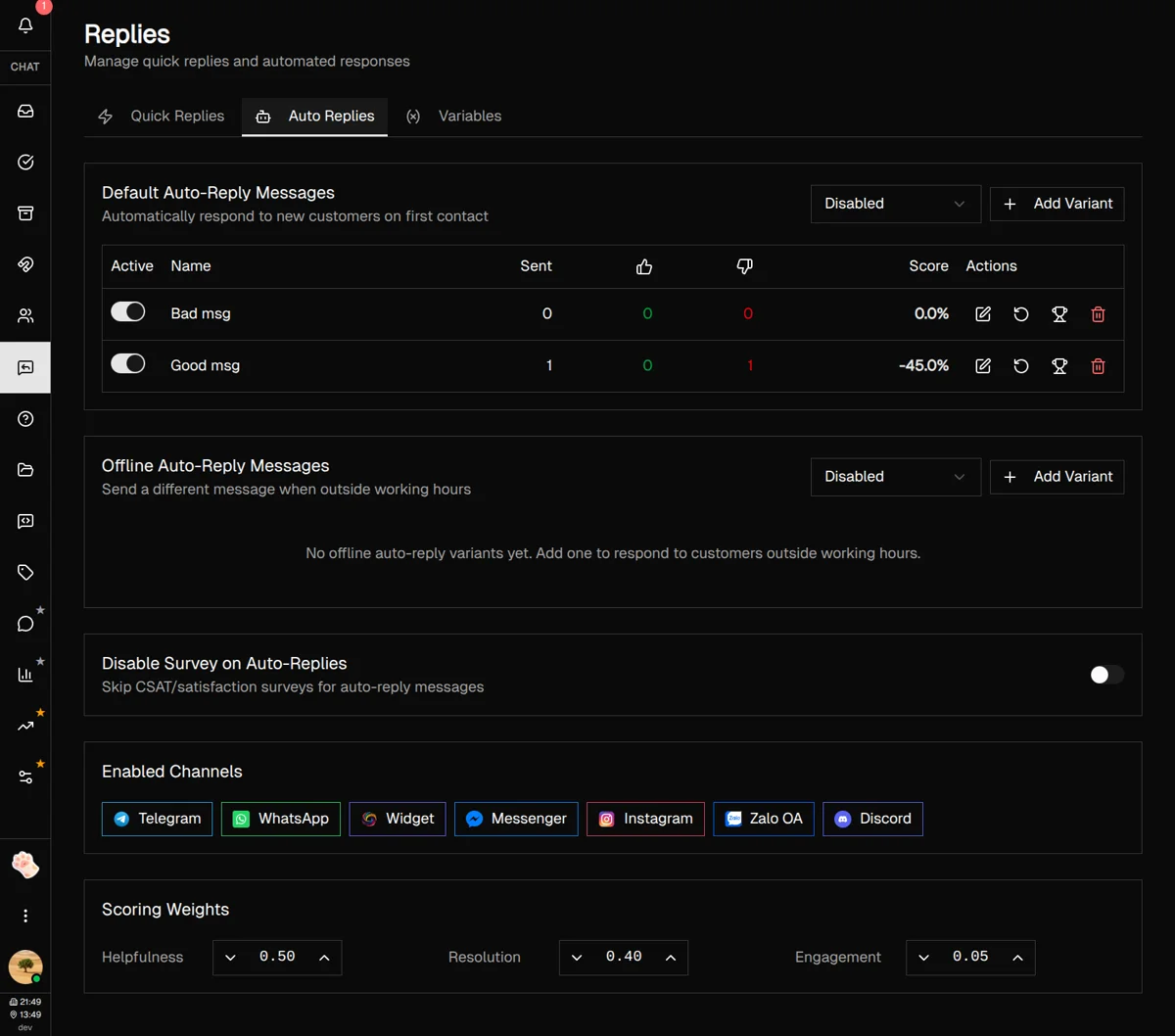
Quick Replies & Auto-Responses

Create reusable message templates for common questions and insert them with a single click. Set up auto-replies that respond instantly when your team is offline or busy. Use dynamic variables like {customer_name} to personalize every message automatically.

  • Pre-written templates for FAQs and common scenarios
  • Auto-reply variants for A/B testing response rates
  • Working hours mode: different replies for off-hours
  • Dynamic variables: customer name, company, and custom fields

AI-Powered Translation & Suggestions

Break language barriers with built-in AI translation that works in real-time. Translate incoming messages to your language, then compose replies that get translated back to your customer's language. AI also suggests relevant quick replies based on conversation context.

  • Real-time message translation (50+ languages)
  • AI reply suggestions based on conversation context
  • Configurable tone: professional, friendly, or casual
  • Bring your own API key for unlimited AI usage
Team Chat & Collaboration

Team Chat & Collaboration

Your support team can communicate internally without leaving Converge. Discuss customer issues, share context, and coordinate responses in real-time. Assign conversations to specific agents, add internal notes visible only to your team, and see who's online right now.

  • Internal team chat separate from customer conversations
  • Assign conversations to specific team members
  • Private notes on customer profiles for context
  • Online presence indicators for your entire team
Tags & Customer Organization

Tags & Customer Organization

Categorize customers with color-coded tags for VIPs, product interests, support issues, or any custom classification. Create tag groups to keep things organized. Filter your inbox by tags to focus on specific customer segments or escalation priorities.

  • Color-coded tags with custom naming
  • Tag groups for organized categorization
  • Filter conversations by one or multiple tags
  • Bulk tag operations for efficient organization
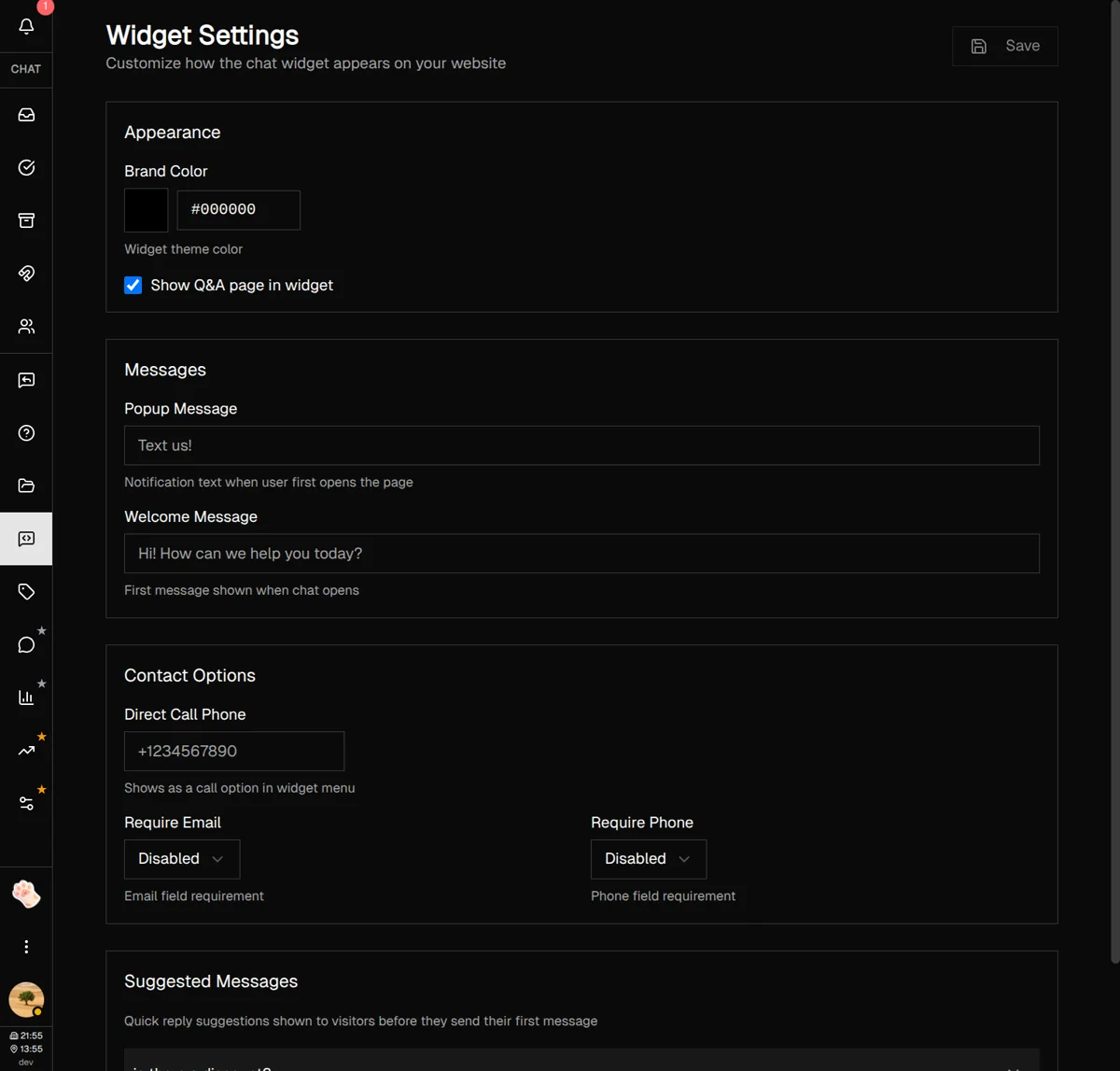
Embeddable Chat Widget

Embeddable Chat Widget

Add a customizable chat widget to your website with a single line of code. Match your brand colors, set welcome messages, and configure popup triggers. The widget includes FAQ self-service, file uploads, and typing indicators—all optimized for mobile and desktop.

  • One-line installation on any website
  • Customizable colors, messages, and positioning
  • Built-in FAQ for self-service deflection
  • File uploads, emojis, and typing indicators

Customer Support Explained

Clear answers to common questions about modern customer support tools.

What is a unified inbox?

What is a unified inbox?

A unified inbox is a centralized system where all customer communications—regardless of channel—come together in one place. Instead of managing separate apps for email, WhatsApp, Instagram DMs, and live chat, everything flows into a single interface your entire team can access. This eliminates the chaos of switching between apps and ensures no customer message gets lost.
Read the complete unified inbox guide
What is omnichannel customer support?

What is omnichannel customer support?

Omnichannel customer support means providing seamless service across all communication channels—email, chat, social media, messaging apps—with shared context. Unlike multi-channel support where each channel operates independently, omnichannel ensures customers can switch channels without repeating themselves. Companies with strong omnichannel strategies retain 89% of customers versus 33% for those without.

Learn about omnichannel support strategies
How does lead scoring work?

How does lead scoring work?

Lead scoring assigns numerical values (typically 0-100) to website visitors and leads based on their likelihood to convert. Scores increase based on engagement signals: pages visited, time on site, chat interactions, email opens, and demographic fit. Higher scores indicate sales-ready leads, helping your team prioritize outreach and focus on prospects most likely to buy.

View lead scoring definition

What are quick replies in customer support?

Quick replies are pre-written message templates that support agents can insert with one click instead of typing repetitive responses. They ensure consistent messaging across your team, dramatically reduce response times, and maintain quality for common questions like shipping status, return policies, or troubleshooting steps. Most support tools allow variables like {customer_name} for personalization.

View quick reply definition
How do auto-replies improve response times?

How do auto-replies improve response times?

Auto-replies send immediate automated responses when customers first reach out, acknowledging their message and setting expectations. This reduces perceived wait time even when agents aren't immediately available. Advanced auto-reply systems can answer common questions automatically, route conversations to the right team, and provide different responses during vs. outside business hours.

Learn response time optimization strategies

One plan. Unlimited everything.

Stop paying per seat. Start scaling.

$49 /month

Everything included. No surprises.

  • Up to 15 team members
  • Unlimited conversations
  • All messaging platforms
  • Lead tracking & scoring
  • Team chat & collaboration
  • Quick replies & auto-responses
  • Analytics dashboard
  • Priority support
Start Free Trial

14-day free trial

Compare to others

Zendesk $55/agent/mo
$275/mo for 5 agents
Intercom $74/seat/mo
$370/mo for 5 seats
Freshdesk $49/agent/mo
$245/mo for 5 agents

You save $200+/month

with Converge flat pricing

No per-seat fees No usage limits Cancel anytime

Frequently Asked Questions

Everything you need to know about Converge

Converge integrates with Telegram, WhatsApp, Discord, Zalo, and includes an embeddable widget for your website. All conversations from these platforms appear in one unified inbox.
We offer a simple flat-rate pricing model. This includes up to 20 team members, unlimited platforms, and unlimited conversations. No per-seat charges or hidden fees.
Getting started is simple: 1. Sign up for a free account. 2. Connect your first messaging platform (takes ~2 minutes). 3. Start receiving and responding to messages in your unified inbox.
The 14-day free trial includes full access to all Pro features: unlimited platforms, up to 20 team members, internal notes, quick replies, rich media support, and priority support.
Yes! You can invite up to 20 team members using their email address and assign different roles (Owner, Admin, or Agent) with appropriate permissions.
Yes. All data is encrypted in transit and at rest. We follow GDPR-compliant data practices and never share your customer data with third parties. You maintain full ownership of all conversations and customer information.
Yes, you can cancel your subscription at any time with no penalties or fees. Your data remains accessible until the end of your billing period.

Learn More About Customer Support

Explore our guides and resources

Ready to Simplify Your Customer Support?

Join businesses using Converge to streamline their customer communication across all messaging platforms

Setup in 5 minutes • Cancel anytime