Unified Inbox Software in 2026: What It Actually Costs
 Converge Team
Your support team has WhatsApp open in one tab, Gmail in another, Instagram DMs in a third—and a Telegram notification just popped up somewhere. While your agents play tab roulette, a customer who emailed yesterday is now messaging on WhatsApp asking why nobody replied. A unified inbox pulls every one of those conversations into a single dashboard so nothing falls through the cracks.
Here's the problem in numbers: 46% of customers expect an email reply inside 4 hours, yet the average company takes 12 hours and 10 minutes to answer one and 62% never answer at all (SuperOffice Customer Service Benchmark Report, 1,000 companies emailed). That gap exists partly because agents waste 30+ minutes per day switching between apps instead of actually helping people. A unified inbox closes that gap by giving your team one place to see, assign, and respond to every message—regardless of the channel it came from.
This guide covers what unified inbox software does, which features matter, and what it costs. On the pricing: we re-read every vendor's public pricing page on 21 August 2026 rather than citing figures from last year's roundups, and three of the cheapest-looking plans turned out to be unbuyable for an 8-agent team—capped at 5 seats, restricted to a single channel, or no longer published at all. Those caps are in the pricing section, with the AI add-on fees that sit on top.
What is a Unified Inbox?
A unified inbox is software that consolidates customer messages from multiple communication channels—WhatsApp, email, Instagram, Telegram, Messenger, live chat, and more—into a single interface. Instead of your agents logging into six different apps every morning, they open one dashboard and see every conversation in one queue.
Picture this: a customer DMs you on Instagram asking about sizing, then emails your support address with their order number, then sends a WhatsApp message asking for a status update. Without a unified inbox, three different agents might pick up what looks like three separate requests. With one, your team sees a single conversation thread with the full history attached—no matter which channel the customer used.
This page is the buying guide: what the category is, what it costs, and how to shortlist. If you have already decided and want the hands-on version—connecting channels, setting routing rules, and the order to roll them out in—read our step-by-step unified inbox implementation guide instead. And if you have not yet settled on the category at all, the wider customer support software guide compares the unified inbox against helpdesks, live chat and AI platforms, with a reconciled per-agent rate card for each.
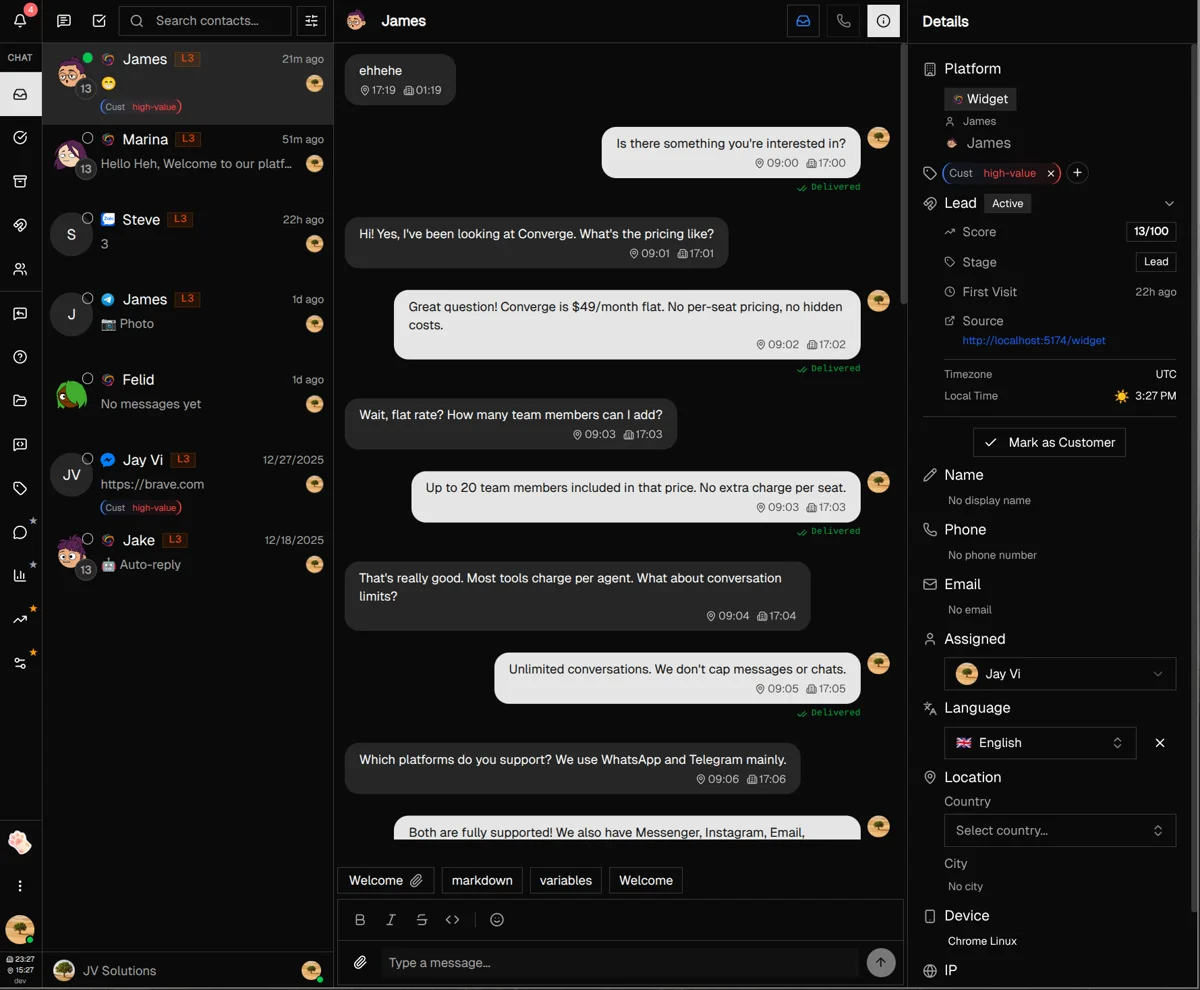
The concept has evolved significantly over the past few years. Early "unified" tools were really just email aggregators that pulled multiple inboxes together. Today's platforms integrate messaging apps, social media DMs, website chat widgets, and traditional email into a genuinely cross-channel experience. The best ones also layer in AI suggestions, auto-routing, and customer context panels so agents have everything they need without leaving the conversation view.
Here's why this matters: B2B customers now regularly use ten or more channels to interact with suppliers, up from five in 2016 (McKinsey B2B Pulse, 2024)—and consumer expectations follow the same trajectory. Without a unified inbox, your team ends up with these daily frustrations:
- ✗ Constant app-switching that burns 30+ minutes per agent per day on context changes alone
- ✗ Lost context when customers switch channels mid-conversation—agents ask them to repeat everything
- ✗ Missed messages during peak hours, especially on platforms without persistent desktop notifications
- ✗ Duplicate replies when two agents unknowingly respond to the same customer on different channels
- ✗ Fragmented reporting—counting total conversations becomes a manual spreadsheet exercise
Unified Inbox vs Multichannel Support: What's the Difference?
A lot of businesses think they have "omnichannel support" because they respond on multiple platforms. That's actually multichannel—and the difference matters more than you'd expect.
Multichannel means you're present on multiple platforms. Unified inbox means those platforms are connected. From the customer's perspective, the gap is enormous: in a multichannel setup, they restart from zero every time they switch channels. In a unified setup, the conversation follows them.
Multichannel (Separate Tools)
- Each channel lives in its own app or browser tab
- Agents juggle 5+ tools throughout the day
- Customer emails on Monday, WhatsApps on Tuesday—agent has zero context
- Messages slip through during peak hours or shift changes
- "How many total conversations did we have this week?" requires a spreadsheet
- Response times vary wildly by channel (email: hours, chat: minutes)
Unified Inbox (One Platform)
- All channels stream into one queue with a single priority system
- Agents work from one interface all day—no tab-switching
- Full conversation history follows the customer across channels automatically
- Every message is tracked, assigned, and has a clear status
- Unified analytics give you the complete picture in real time
- Consistent SLAs enforced across every channel
The business impact: The gap shows up in the moments customers remember. Asking someone to repeat their order number because they switched from email to WhatsApp is a multichannel problem; greeting them with full context is a unified inbox outcome. Repeat that difference across hundreds of conversations per month and it compounds into measurably different retention.
Why Does Your Team Need a Unified Inbox?
Beyond convenience, unified inbox software delivers results you can actually measure. Qualtrics XM Institute's global consumer analysis published in November 2025 (20,001 consumers across 14 countries) estimates nearly $3 trillion in sales worldwide is at risk from bad customer experiences — 34% of consumers reduce spending with a company after a negative experience and 13% cut it entirely. Slow responses, lost context, and inconsistent experiences across channels are exactly the kind of failure that triggers those cuts.
Here's what teams typically see after switching from separate tools to a unified platform:
40-60% Faster Response Times
When agents aren't switching between apps, they respond faster. Most teams see first-response times drop from hours to under 30 minutes. The benchmark to beat is low: SuperOffice's Customer Service Benchmark Report measured an average reply time of 12 hours and 10 minutes across 1,000 companies—this is where you pull ahead. Full context in one view also cuts the extra back-and-forth that inflates resolution time across most industries.
Higher Customer Satisfaction
More than 50% of consumers will switch to a competitor after a single bad experience, and 73% after several, per Zendesk Benchmark data. When your agents have full context from the start—no 'can you repeat that?'—satisfaction scores climb and churn drops.
2+ Hours Saved Per Agent Daily
Gloria Mark's UC Irvine research — a 2005 study of interrupted knowledge work — found it takes about 23 minutes to fully return to an interrupted task. An agent checking 6 different messaging apps can burn 2+ hours daily just getting re-oriented. Unifying those apps into one view eliminates most of that waste.
Zero Missed Messages
Every conversation is queued, tracked, and has an owner. No more 'sorry, your Instagram DM got buried'—assignment and status tracking ensure nothing sits unanswered.
How this plays out in practice
An e-commerce support team was using WhatsApp, Gmail, and Instagram as separate apps with 3 agents handling roughly 200 daily conversations. After moving to a unified inbox:
- Same conversation volume handled by 2 agents instead of 3
- Average first-response time dropped from 2.5 hours to 18 minutes
- Missed-message rate went from ~8% to effectively zero
- The freed-up agent moved to proactive customer success work
Which Channels Can You Unify?
The best unified inbox platforms support the channels your customers actually use—not just email and basic chat. Here's what you should be looking to consolidate:
Start with your top 3 channels—don't boil the ocean
Trying to connect 10 channels on day one leads to a messy rollout. Instead, audit where 80% of your conversations actually happen and start there. For most B2C businesses, that's WhatsApp + email + one social channel. B2B teams usually start with email + live chat + one messaging app. You can always add more channels later once the core workflow is dialed in.
Converge supports WhatsApp, Telegram, Instagram, Facebook Messenger, Discord, Zalo, Gmail, custom email domains, and an embeddable website widget—all included for $49/month total, billed to the company (up to 15 agents). The same widget doubles as an inbound lead capture tool, scoring visitors and surfacing high-intent profiles before they ever start a chat. See all channel details
Regional channels matter more than you think
If you serve customers in Southeast Asia, Zalo customer support (Vietnam) and LINE (Japan/Thailand) might be more important than Messenger. In South Korea, KakaoTalk reaches nearly the entire population. In Eastern Europe, Telegram dominates. In Latin America, WhatsApp is effectively the default. The "right" channels depend entirely on where your customers are. Make sure any platform you evaluate supports the regional messaging apps relevant to your market. See our regional support guides for channel recommendations by geography.
What Features Does Unified Inbox Software Need?
Every platform claims to be "all-in-one." Here's how to tell which features actually improve your team's day-to-day, versus which ones just look good in a feature comparison table:
Features That Become Critical at Scale
These might seem optional when you're a 3-person team, but once you hit 8+ agents or 200+ daily conversations, they become non-negotiable:
How to Choose the Right Unified Inbox Platform
With dozens of options on the market—from enterprise helpdesks to lightweight messaging tools—here's a practical 5-step framework to avoid buying the wrong one:
List Your Channel Requirements (Today + 12 Months)
Start by listing every channel you use today, then add any you expect to need within the next year. Eliminate platforms that don't support your must-haves—don't settle for "coming soon."
- Which 3 channels drive 80% of your support volume?
- Do you need WhatsApp Business API specifically (not just personal WhatsApp)?
- Any regional channels your competitors already support? (Zalo, LINE, Discord)
- Will you need a website chat widget or just messaging app integrations?
Calculate Total Cost of Ownership (Not Just Sticker Price)
Per-seat pricing looks affordable in a demo. Then you do the math for your actual team. A "just $29/agent" tool costs $3,480/year for 10 agents—before channel add-ons and overage fees.
- What's the total monthly cost at your current headcount?
- What happens when you add 5 more agents next year?
- Are all channels included, or is WhatsApp/Instagram an extra charge?
- Any conversation limits, contact limits, or API rate limits?
- What's the cost of the tier you actually need? ('Starter' plans often miss critical features.)
Run a Real Workday During Your Trial
Feature lists don't tell you if the UI is actually fast. During your free trial, simulate a full day of real support work:
- How many clicks to send a quick reply to a common question?
- Can you see the customer's full cross-channel history without excessive scrolling?
- Is it immediately obvious which conversations need attention?
- Does search actually return useful results in under 2 seconds?
- Does the mobile experience match the desktop? (Test this on actual phones.)
Check Team Collaboration Capabilities
The best unified inbox is useless if your team can't coordinate inside it. Verify these collaboration basics:
- Can agents leave internal notes on conversations (invisible to customers)?
- Is there collision detection to prevent duplicate replies?
- Can conversations be reassigned between agents or teams?
- Does it show online/offline status for team members?
Evaluate the Migration Path
Switching tools is painful. Minimize the disruption by confirming:
- Can you export data from your current platform?
- Can the new platform import historical conversations?
- Can you reconnect channels (WhatsApp, website widget) without downtime?
- Does the vendor offer migration assistance or documentation?
What Does Unified Inbox Software Cost in 2026?
Pricing in this space ranges from free-with-limitations to $150+ per agent per month. The pricing model matters as much as the sticker price—it determines whether your costs scale predictably or surprise you with overages.
| Pricing Model | Typical Range | Watch Out For |
|---|---|---|
| Per-Seat | $15-150/agent/month | Costs multiply linearly. 10 agents × $50/seat = $6,000/year. Adding seasonal staff gets expensive fast. |
| Usage-Based | $0.01-0.10/conversation | Unpredictable monthly bills. A viral social media post can blow your budget overnight. |
| Per-Channel | $20-200/channel/month | WhatsApp alone can add $50-200/month on some platforms. Each new channel increases your base cost. |
| Tiered | $50-500/month | Critical features gated behind higher tiers. "Starter" plans often exclude auto-routing, analytics, or WhatsApp. |
| Flat Rate ✓ | Fixed monthly price | Predictable. No per-seat surprises. Converge: $49/month for up to 15 agents, all channels included. |
Real math: What 8 agents costs on different platforms
We re-pulled every vendor pricing page on 21 August 2026 and priced the same team: 8 agents, annual billing, all channels connected. The headline tier is often not the tier an 8-person team is allowed to buy: the cheapest advertised plan at four of these five vendors is capped below 8 seats, restricted to a single channel, or no longer published as a number at all.
- Missive Productive ($24/user/mo annual)$192/month
- Help Scout Standard ($25/user/mo annual)$200/month
- Zendesk Suite Team ($55/agent/mo annual)$440/month
- Front Professional ($65/seat/mo annual)$520/month
- Intercom (seat price not published; $0.99 per Fin AI outcome on top)not quotable
- Converge (flat rate, all channels)$49/month
All figures read directly from each vendor's public pricing page on 21 August 2026, annual billing. Monthly billing runs higher on every platform listed.
Four caps that break the cheap-tier math
- Missive Starter ($14/user) tops out at 5 users. An 8-agent team cannot buy it at any price — the real entry point is Productive at $24/user, which is where rules, integrations and analytics also start. Quoting Missive at "$14 × 8 = $112" is arithmetic on a plan that will refuse the eighth seat.
- Front Starter ($25/seat) is single-channel by design. Front's own plan table restricts Starter to one channel type — email, or Front Chat, or SMS. Omnichannel starts at Professional ($65/seat). Front Starter is a shared inbox, not a unified one, so it does not belong in this comparison at all.
- Zendesk stopped publishing an Enterprise price. Suite Team is $55 and Suite Professional is $115, but Suite Enterprise + Copilot is now "Talk to Sales" only. Any guide still quoting a firm $169/agent Enterprise number is repeating a figure Zendesk no longer stands behind publicly.
- Intercom no longer shows a static seat price. Its pricing page renders seat costs as an animated digit counter rather than a fixed number, and every plan carries $0.99 per Fin AI outcome on top of seats. You cannot compute an Intercom bill from the pricing page alone — you have to model resolution volume, which is exactly the number a buyer does not have before switching.
Watch the AI add-on line item
In 2026 the sticker price increasingly hides the AI bill, and the add-on menus have grown since most comparison guides were written. As of 21 August 2026: Zendesk's Copilot is a $50/agent/month add-on (and only attaches to Professional and above). Front sells Copilot at $20/seat, Smart QA at $20/seat and Smart CSAT at $10/seat, plus Autopilot from $0.05/conversation. Help Scout bills AI Answers at $0.75 per resolved conversation. Intercom charges $0.99 per Fin outcome on every plan — AI is not an add-on there, it is the billing model. Missive still requires you to bring your own OpenAI or Anthropic API key.
Front's stack is the clearest illustration. A Professional seat is $65. Add Copilot and Smart QA and the effective cost is $105/seat — the same number Front charges for its Enterprise plan, which includes Copilot, QA and CSAT outright. In other words, an 8-agent Front team that wants two AI features pays Enterprise money for a Professional plan and gets fewer of the surrounding features. If you are going to buy the add-ons, price Enterprise first.
Screenshot: Converge billing screen showing the flat $49/month line item with agent count and connected channels visible, captured 2026-08-21 — evidences the flat-rate claim against the per-seat table above
Who should not buy on price alone: if your volume is spiky — seasonal retail, a product launch, anything with a viral tail — per-resolution AI pricing (Help Scout, Intercom, Front Autopilot) turns your support bill into a variable cost you cannot forecast. Help Scout at least lets you set a hard monthly cap on AI resolutions, which is the single most underrated line in its pricing page. If nobody on your team will own that cap, avoid consumption-priced AI entirely and take a bundled or flat-rate platform instead.
See detailed per-platform pricing breakdowns for 58+ tools: Full Pricing Comparison
Which Unified Inbox Platforms Should You Compare?
We've analyzed 58+ platforms across pricing, channel support, features, and ease of use. If you're weighing two specific tools, start with the head-to-heads: Front vs Help Scout for the mid-market shared inbox decision, Hiver vs Missive for Gmail-centric teams, Freshdesk vs Intercom for the ticketing-versus-AI-chat helpdesk decision, Acquire vs Smooch if you're evaluating visual engagement tools against a messaging API layer, and Podium vs Converge if you're weighing an SMS-and-reviews platform against a multi-channel messaging inbox. For everything else, start here:
Unified Inbox FAQ
A unified inbox is a centralized platform that pulls customer messages from every channel—WhatsApp, email, Instagram, Telegram, Messenger, live chat—into a single interface. When a customer messages you on Instagram and follows up via email, your agent sees both as one continuous conversation thread. Instead of checking six different apps, your team works from one dashboard with full conversation history, customer context, and team collaboration tools built in.
A shared inbox lets multiple team members access the same email account (like [email protected]). A unified inbox goes further—it aggregates messages from email plus WhatsApp, Instagram, Telegram, Messenger, live chat, and other channels into one view. Think of a shared inbox as solving the 'multiple people, one email' problem, while a unified inbox solves the 'multiple channels, one team' problem. If your team is still just coordinating one email address, our shared inbox software guide covers that narrower use case; the rest of this page assumes you also need messaging channels unified. Most modern support teams end up needing both.
Per-seat pricing runs roughly $14-115/agent/month on published tiers (vendor pricing pages, checked 21 August 2026): Missive Starter $14/user but capped at 5 users, Missive Productive $24, Help Scout Standard $25, Front Starter $25 (single-channel only), Zendesk Suite Team $55, Front Professional $65, Help Scout Pro $75, Zendesk Suite Professional $115. Zendesk's Enterprise tier and Intercom's seat prices are no longer published as fixed numbers—both are quote-only. On top of seats, AI is billed separately: $50/agent (Zendesk Copilot), $20/seat (Front Copilot or Smart QA), $0.75 per resolution (Help Scout AI Answers), $0.99 per outcome (Intercom Fin). Flat-rate options bundle all channels and AI into one fixed price. For 8 agents, the realistic published range is about $192-920/month before AI add-ons.
Major platforms with WhatsApp support include Respond.io, Trengo, Front, Intercom, Zendesk, Help Scout, Freshdesk, and HubSpot. The critical detail is how it is billed, and the three common models look nothing alike (vendor pricing pages, 21 August 2026). Front sells a native WhatsApp channel as a paid add-on on Professional and Enterprise only, priced as your Meta-billed WhatsApp costs plus a 20% admin fee—so Front takes a cut of a bill Meta sets. Intercom bills WhatsApp per conversation, varying by volume and direction. Help Scout includes WhatsApp, Instagram and Messenger on its Standard tier at no extra channel charge. Also confirm the integration supports WhatsApp templates, media messages and the full Business API rather than a scraped personal-account bridge.
Basic setup—connecting 2-3 channels and inviting your team—typically takes 1-2 hours. WhatsApp Business API requires Meta approval, which can take 24-48 hours. Email and Telegram integrations usually connect in minutes. Full deployment with auto-reply templates, routing rules, and team training takes 1-2 weeks. Most platforms offer 14-day trials so you can test with real conversations before committing.
Yes—a unified inbox attacks the two biggest causes of slow replies: app-switching and unseen messages. SuperOffice's Customer Service Benchmark Report, which emailed 1,000 companies and scored the replies, found the average response takes 12 hours and 10 minutes and that 62% of companies never reply at all, while its consumer survey with Jeff Toister found 46% of customers expect an answer inside 4 hours. Consolidating channels eliminates the 30+ minutes per agent lost daily to switching apps and ensures no message sits unnoticed in a separate tool. Teams typically see first-response times drop by 40-60% after switching—from hours to under 30 minutes.
For teams under 15 agents, per-seat pricing is what hurts: Zendesk Suite Team at $55/agent is $825/month for 15 people, and Front Professional at $65/seat is $975. Watch the seat caps too—Missive's $14 Starter tier stops at 5 users and Help Scout's Standard tier at 25, so the cheap number you budgeted may not survive your next two hires (vendor pricing pages, 21 August 2026). The factors that actually matter for a small team: a price that doesn't change when you hire, all channels included from day one, AI in the base price rather than metered per resolution, and no critical feature gated behind a tier you can't justify.
Yes, with real limits. Help Scout's free plan gives you 5 users, 1 inbox and 1 Docs site, capped at 100 contacts per month and 10 saved replies (Help Scout pricing page, 21 August 2026)—the contact cap is the one that bites first. Hiver offers a free tier inside Gmail covering email and live chat only, with no WhatsApp, Instagram or Telegram. Freshdesk's free plan handles basic email ticketing. The pattern across free tiers: email plus maybe one channel, with the messaging channels that make an inbox genuinely unified sitting behind paid plans. Free tiers are good for evaluating an interface; teams handling real multi-channel volume outgrow them within months.
Multichannel means you're present on multiple platforms—but each runs as a separate silo. When a customer emails you, then messages on WhatsApp, your agents see two disconnected conversations with no shared context. Unified inbox connects these channels so agents see one customer timeline across all touchpoints. If your team handles more than 50 conversations per day or uses 3+ channels, the efficiency gains of a unified inbox justify the investment.
Most modern unified inbox platforms include AI features like reply suggestions, message summarization, and automatic language translation. AI reads the conversation context and drafts a suggested response your agent can edit before sending—cutting reply time by 30-50% on repetitive questions. Some platforms also use AI for auto-routing (assigning conversations to the right agent based on topic or language) and sentiment detection (flagging frustrated customers for priority handling). The key difference between platforms is whether AI is included in the base price or charged as an add-on—Zendesk charges extra for its Advanced AI add-on, while some platforms bundle AI features into every plan.
Ready to try Converge?
$49/month flat. Up to 15 agents. 7-day free trial, no credit card required.
Start Free Trial